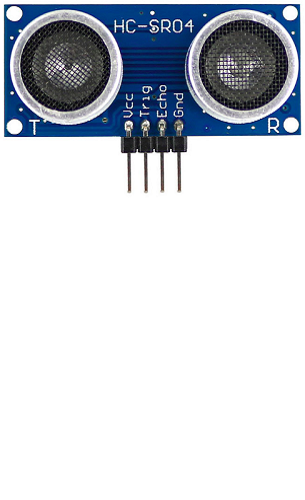
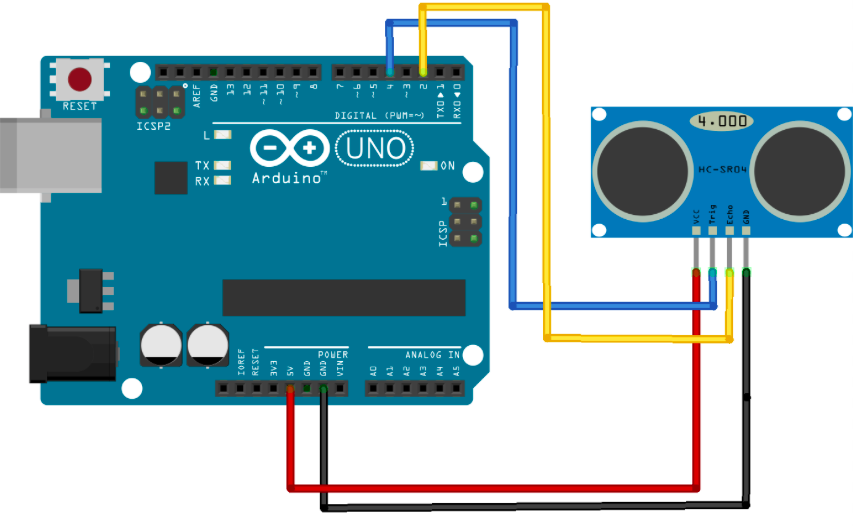
There are only four pins that you need to worry about on the HC-SR04: VCC (Power), Trig (Trigger), Echo (Receive), and GND (Ground). Here a possible connection schema:
If you have problems installing libraries into your arduino framweork you can read my tutorial
Let's startincluding the ping library:
#include
NewPing sonar(TRIGGER_PIN, ECHO_PIN, MaxDistance);
MaxDistance is the distance you want to use as reference point as maximum that can be encountered. This value is used to tune the sonic sensor and the algorithm.
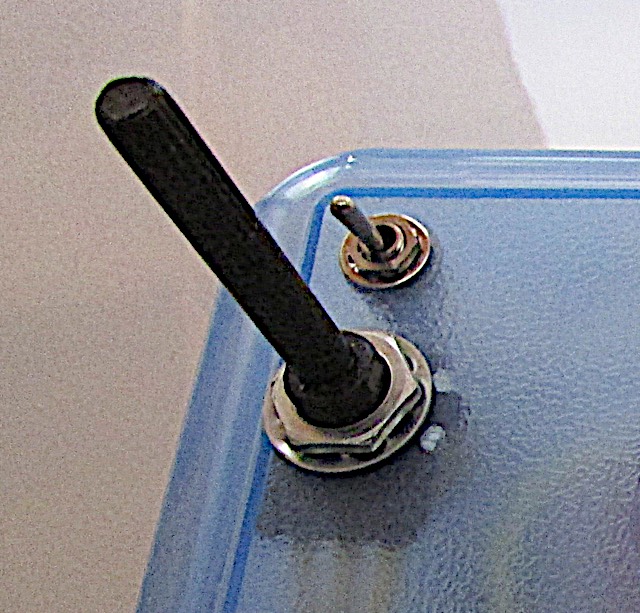
In order to read constantly this value as a dynamic parameter I installed on the left side of the multidimensional box a potentiometer. Rotating the potentiometer I can vary the max distance parameter.
This is also the reason why it is a variable and not a costant in the code you saw.
If you want to learn how to connect and use a potentiometer with Arduino you can read this simple tutorial
 You can retrieve the distance measured in cm using the function:
sprintf(Centimeter, "%lu", sonar.ping_cm());
- sonar.ping(); - Send a ping, returns the echo time in microseconds or 0 (zero) if no ping echo within set distance limit
- sonar.ping_in(); - Send a ping, returns the distance in inches or 0 (zero) if no ping echo within set distance limit
- sonar.ping_cm(); - Send a ping, returns the distance in centimeters or 0 (zero) if no ping echo within set distance limit
- sonar.ping_median(iterations); - Do multiple pings (default=5), discard out of range pings and return median in microseconds
- sonar.convert_in(echoTime); - Converts microseconds to distance in inches
- sonar.convert_cm(echoTime); - Converts microseconds to distance in centimeters
- sonar.ping_timer(function); - Send a ping and call function to test if ping is complete.
- sonar.check_timer(); - Check if ping has returned within the set distance limit.
- timer_us(frequency, function); - Call function every frequency microseconds.
- timer_ms(frequency, function); - Call function every frequency milliseconds.
- timer_stop(); - Stop the timer.
In my specific case I decided to give in the oled a graphical representation of the distance measured by the sonic sensor.
For this reason I draw a view area and an y line proportional to the measure of the conical area. The proportion, is based on the max distance read from the potentiomenter.
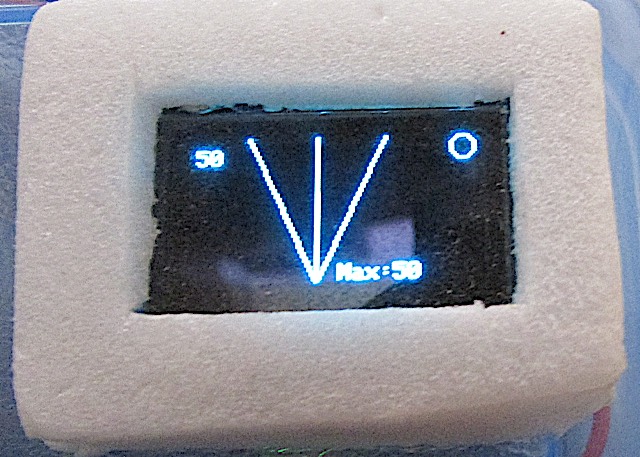 In the picture, the max value=50 is the value in centimeters evaluated based on the potentiometer current value.
The screen you've seen is very easy to obtain using the adafruit graphcal library i described in the page I dedicated to the gps and to the oled functions
In order to display the right view on the panel (GPS, Accellerometer or distances) I build a draw function and this is the section related to the SONAR view.
else if (Display == DISPLAY_SONAR)  {
  int BarLong;

  //display.drawCircle((display.width() - WIDTH_SIGNAL_AREA) / 2, display.height() / 2, display.height() / 2-2, WHITE);
  display.drawLine((display.width() - WIDTH_SIGNAL_AREA) / 2 - 30, 0, (display.width() - WIDTH_SIGNAL_AREA) / 2, display.height(), WHITE);
  display.drawLine((display.width() - WIDTH_SIGNAL_AREA) / 2 + 30, 0, (display.width() - WIDTH_SIGNAL_AREA) / 2, display.height(), WHITE);

  Serial.print("Distanza:");
  Serial.println(atoi(stringGPS));
  BarLong = map(atoi(stringGPS), 0, MaxDistance/2, 0, display.height());
  Serial.print("BarLong:");
  Serial.println(BarLong);

  display.drawLine((display.width() - WIDTH_SIGNAL_AREA) / 2, display.height(), (display.width() - WIDTH_SIGNAL_AREA) / 2, display.height() - BarLong, Colour);
  display.setCursor(5, 5);
  display.print(stringGPS);
  display.setCursor((display.width() - WIDTH_SIGNAL_AREA) / 2 + 10, display.height() - 8);

  //Fix the Max Value
  display.setTextColor(WHITE);
  display.print("Max:");
  display.print(MaxDistance/2);
  display.setTextColor(Colour);

}