BVAntivirus
A free basic on-demand antivirus for macOS — portable on a USB stick
Current release: v1.3.0 — August 2026
A free basic on-demand antivirus for macOS — portable on a USB stick
Current release: v1.3.0 — August 2026
Already installed? If you are on an older build, re-download the zip and replace your USB/local copy. Current public package: v1.3.0.
| Feature | v1.0.0 | v1.1.0 | v1.2.0 | v1.3.0 |
|---|---|---|---|---|
| Filesystem + ClamAV / hashes | ✓ | ✓ | ✓ | ✓ |
| Browser extensions & hijack checks | ✓ | ✓ | ✓ | ✓ |
| Memory / process scan | ✓ | ✓ | ✓ | ✓ |
| Interactive quarantine (ask before action) | ✓ | ✓ | ✓ | ✓ |
| USB portable kit + separate signature DB | ✓ | ✓ | ✓ | ✓ |
| Network / DNS integrity (hosts, proxy, TLS canaries) | — | ✓ | ✓ | ✓ |
| Apple Mail forward/redirect & SMTP checks | — | — | ✓ | ✓ |
| Custom trust certificates (MITM hints) | — | — | ✓ | ✓ |
VPN / MDM / .mobileconfig posture |
— | — | ✓ | ✓ |
| CLI / USB menu in English (international UI) | — | — | ✓ | ✓ |
| Disk cleanup (Trash, temps, caches, cookies…) New | — | — | — | ✓ |
| Filesystem repair (broken links / orphans) New | — | — | — | ✓ |
v1.3.0 highlight: USB menu 8 = disk cleanup · 9 = filesystem repair ·
CLI cleanup / repair (confirm each category). Option 6 = posture · 5 = network/DNS.
Completely free: BVAntivirus is a basic security toolkit with no license fees. It is meant for makers and everyday Mac users who want an honest on-demand check — especially after phishing or a fake website — and who want to carry the tool on a USB stick.
Full portable package (~110 MB) including app + signature database.
No private keys or personal quarantine data. Unzip, then double-click AVVIA_BVAntivirus.command.
Real downloads notify vittorio.margherita@buonevacanze.org. Bot hits get a separate BOT DEFENSE alert (ZIP is never served to scrapers).
BVAntivirus is free. If it helped you, a voluntary PayPal donation is appreciated — thank you.
Realistic expectations: This is a basic on-demand scanner, not a commercial real-time antivirus with kernel drivers. Keep Apple Gatekeeper / XProtect enabled. Use BVAntivirus as an extra check after suspicious downloads, fake sites, or unwanted browser extensions — not as a full replacement for enterprise-grade AV.
BVAntivirus helps you verify a Mac after a security scare and remove leftovers only after you explicitly allow it:
/etc/hosts, proxies, canary DNS vs trusted resolvers, TLS checks (hijack / MITM hints)The portable kit is two pieces you carry together:
Double-click AVVIA_BVAntivirus.command. First run installs Python libraries on the stick. Menu: update, full scan, browser, memory, network/DNS, posture (Mail/certs/VPN), status, disk cleanup, filesystem repair, donate.
Separate database/ folder (also as zip) with ClamAV CVDs and threat-intel lists. Update at home, copy to the stick, scan another Mac.
In portable mode, quarantine, logs and JSON reports stay under data/ on the USB — not in the host Library.
These are example terminal screens from a real BVAntivirus session (portable / USB style). Answers are always interactive: type y or n.
After double-clicking AVVIA_BVAntivirus.command, Terminal opens with a simple menu (v1.3.0). Choose 2 for a full scan; options include network/DNS, posture, disk cleanup, filesystem repair, and donate.
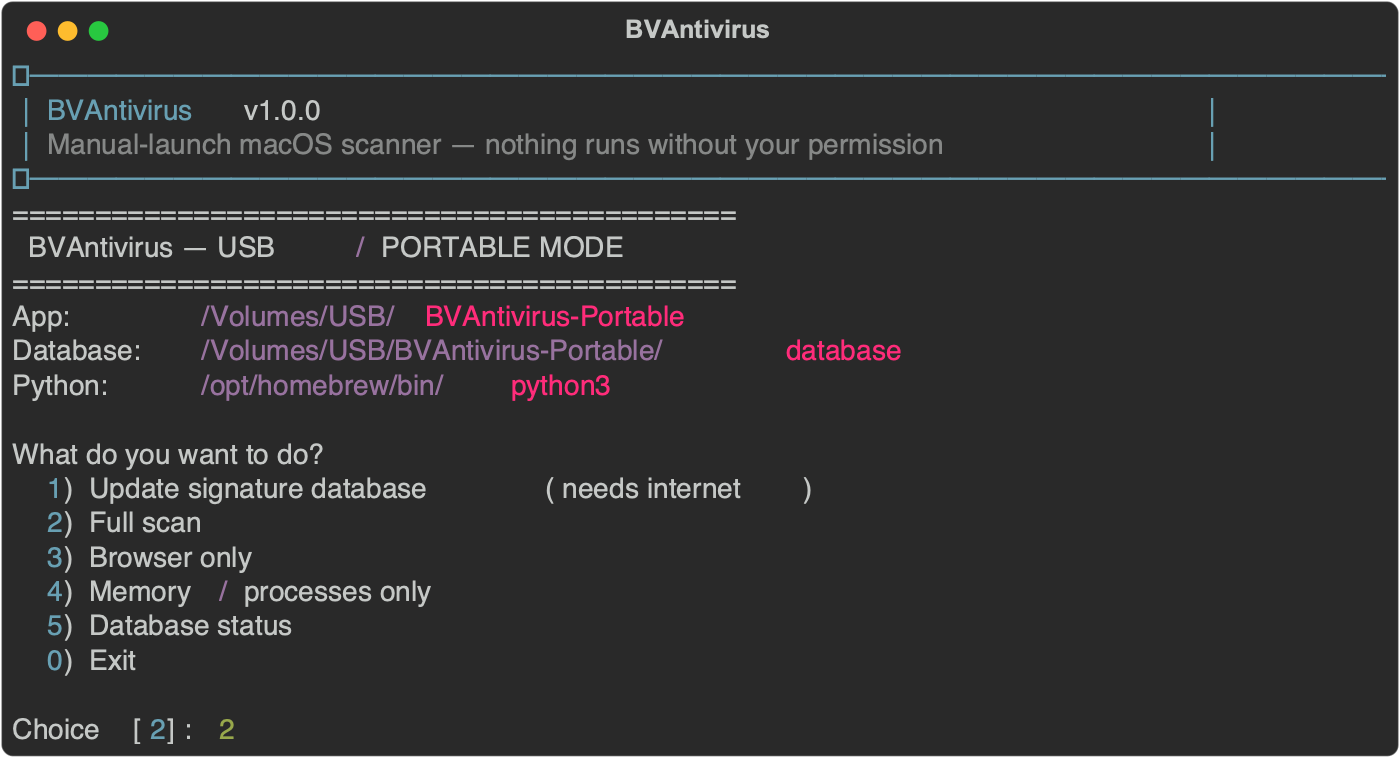
Example: portable menu on the USB stick.
Nothing starts until you confirm. The tool explains scopes (filesystem, browser, memory, network/DNS, posture) and that the first phase is read-only.
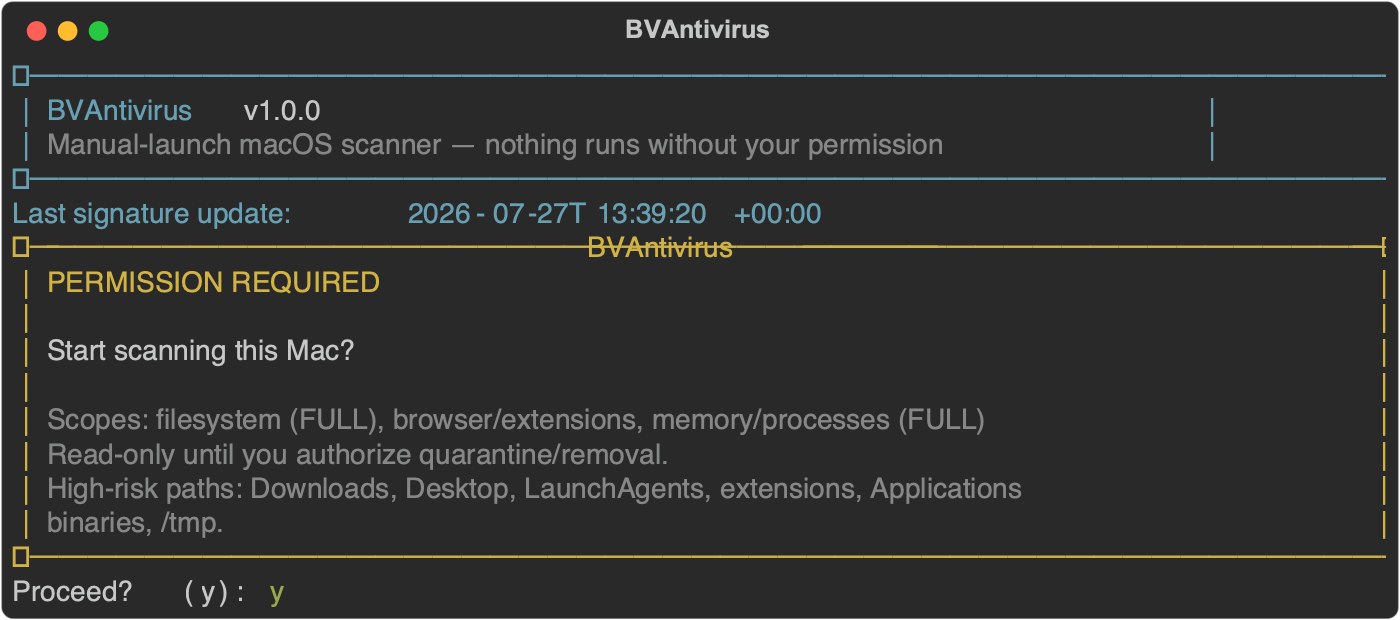
Example: permission panel before the scan starts.
You will see browsers, LaunchAgents, hash matching, ClamAV batches on high-risk paths, then memory/process, network/DNS and posture checks. ClamAV does not try to scan the entire disk (that would time out for little gain).
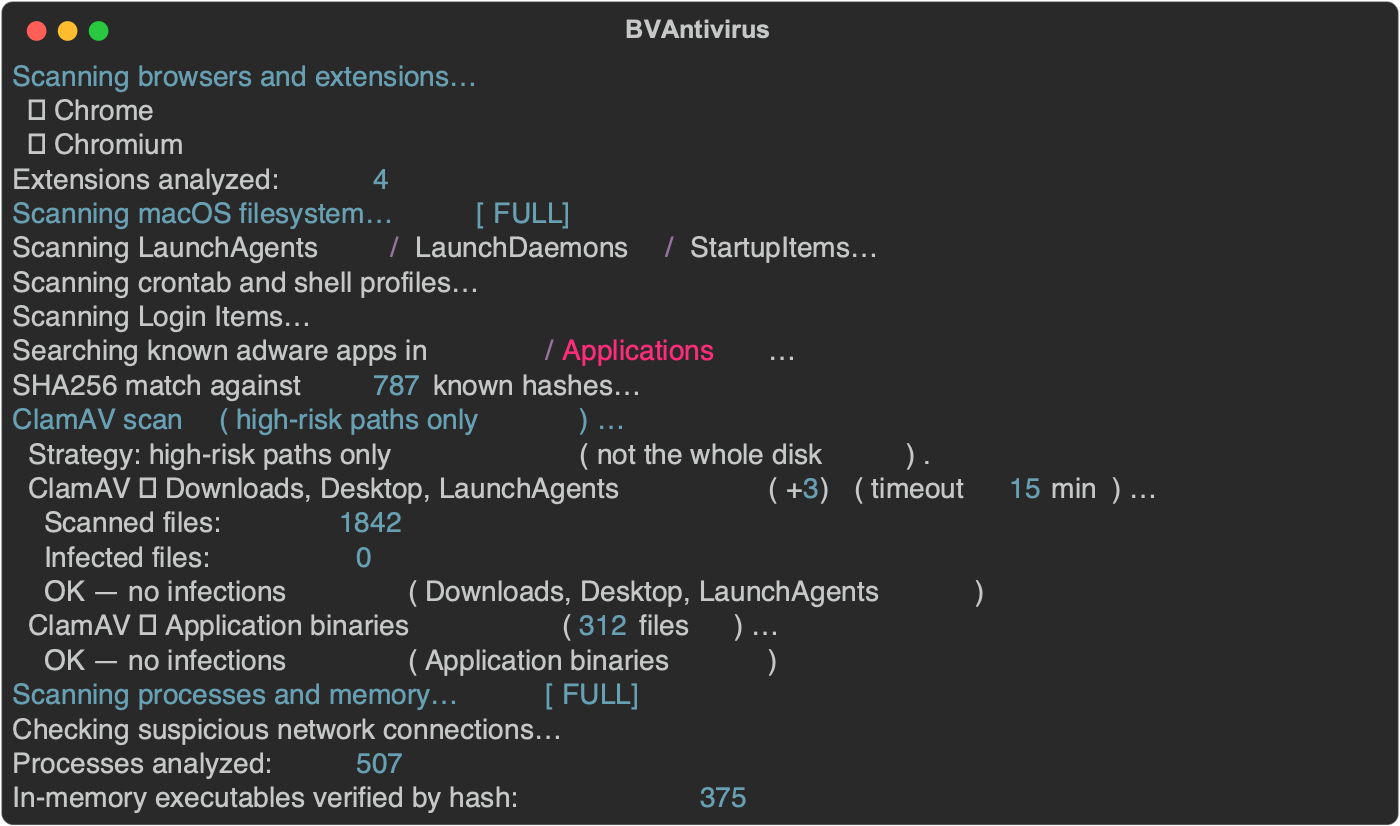
Example: full scan progress output.
If nothing matches current signatures, you get a clear “No threats detected” message and a JSON report path.

Example: clean system against current signatures.
If something is flagged (for example an extension with many invasive permissions), a table is shown. Quarantine happens only if you answer y item by item.
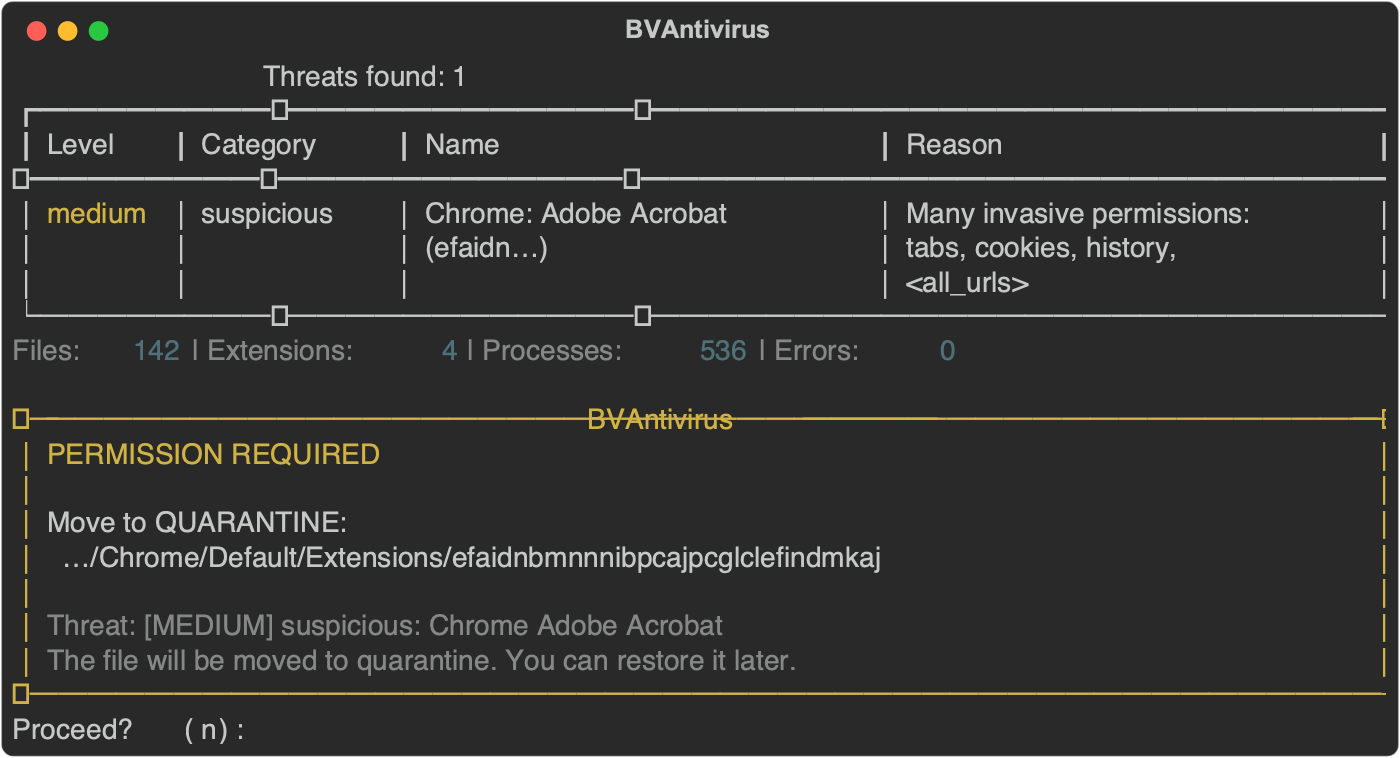
Example: findings table and quarantine permission prompt.
Note: Heuristic “suspicious extension” hits (e.g. Adobe Acrobat / AI helpers) are not always malware. Read the reason, then decide. Legitimate tools can be restored from quarantine or reinstalled from the official store.
BVAntivirus to a USB stick (optional but recommended).AVVIA_BVAntivirus.command.app/vendor inside the package.brew install clamav so ClamAV engines are available.y/n to each permission prompt. Review findings before quarantine.data/ inside the package (portable mode).brew install python clamav (ClamAV recommended).cd BVAntivirus && ./bin/install.sh./bin/bvantivirus update — downloads threat feeds + ClamAV DB into ~/Library/Application Support/BVAntivirus/./bin/bvantivirus scan --full — filesystem + browser + memory + network/DNS + posture./bin/bvantivirus scan --browser./bin/bvantivirus scan --memory --deep./bin/bvantivirus scan --network — DNS / hosts / proxy / TLS canaries./bin/bvantivirus scan --posture — Mail + certificates + VPN/MDM./bin/bvantivirus cleanup --dry-run — measure reclaimable space./bin/bvantivirus cleanup — free disk space (confirm each category)./bin/bvantivirus repair --dry-run — list broken links / orphans./bin/bvantivirus repair — filesystem repair (confirm each category)./bin/bvantivirus statussudo ./bin/bvantivirus scan --full (more process/network visibility)cd BVAntivirus
./bin/install.sh
./bin/bvantivirus update
./bin/bvantivirus scan --fullChrome, Chromium, Edge, Brave, Firefox, Safari, Opera, Vivaldi — installed extensions, invasive permission combinations, search-hijack markers.
Downloads, Desktop, LaunchAgents/Daemons, tmp, browser Extensions folders, Application Contents/MacOS binaries. ClamAV runs in batches with sensible timeouts.
Process list, binaries from unusual paths, SHA256 of running executables vs MalwareBazaar, miner-like remote ports.
System DNS resolvers vs allowlist, sensitive /etc/hosts overrides, HTTP/HTTPS/SOCKS proxies, canary domains vs trusted resolvers (dig), and TLS certificate verification (hijack / MITM hints).
Apple Mail forwarding/redirect rules and uncommon SMTP / mail accounts (classic post-phishing persistence).
User and admin trust settings for custom CAs — a common way to keep HTTPS interception after a fake site.
Configuration profiles, MDM/DEP enrollment, VPN services, and .mobileconfig files in Downloads/Desktop/Documents.
clamav / hash_match — signature or known malware hashbad_extension / suspicious — extension list or permission heuristics (verify manually)adware / persistence — known adware names or LaunchAgent patternsmemory — suspicious process or network behaviordns / network — suspicious resolver, hosts override, proxy, or TLS anomalymail / certificate / profile — Mail rules, custom trust CAs, VPN/MDM/mobileconfig./bin/bvantivirus update
./bin/build-portable.sh
# copy dist/BVAntivirus-Portable → USB
# double-click AVVIA_BVAntivirus.command
# later: refresh only signatures
./bin/pack-database.sh
# replace USB database/ with dist/BVAntivirus-Database contentsTypical kit size with ClamAV signatures: roughly 100–200 MB.
~/Library/Application Support/BVAntivirus/quarantine/BVAntivirus-Portable/data/quarantine/.bva.json sidecar with original path and reason.original_path, or reinstall from the official vendor.Current release
No license cost
On-demand CLI
Portable kit
Ask before quarantine
Related reading: AI-Powered Malware: A New Era of Cyber Threats.
If you need additional specific information about BVAntivirus or want to discuss your project personally, please send an email.