The Power controller is an object I decided to build during my 'Tunnel' for Campers. In fact, the original idea was to have an item able to control its position constantly, to be controlled from a remote mobile phone and to activate or deactivate switches.
Analyzing how to activate and deactivate switches I found very interesting the possibility to activate and deactivate high voltage switches like relays to power on and off any 220 V item in my house (or in my camper).
So, just to recap the main idea was to:
Always know the position of this object
Always be able remotely to control some actions using a mobile phone
Activate and deactivate 220V switches able to power any electronic stuff in my camper
In order to do this, I found, using internet, a very interesting object sold by Adafruit called Fona
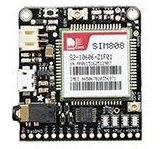 Adafruit Fona is an interesting controller that can be used as GSM/GPRS module and contemporary has a GPS module on board. It is very easy to drive also because Adafruit has built a simple library to use it.
My intent was to use this component connected with an Arduino uno module.
Here a picture of how the Fona module has been installed into the box I used for the Power Activator.
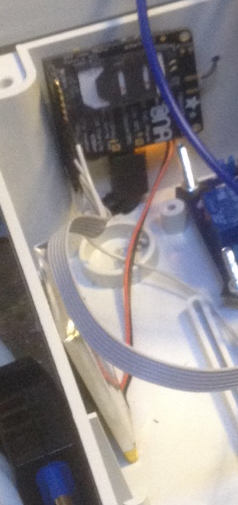
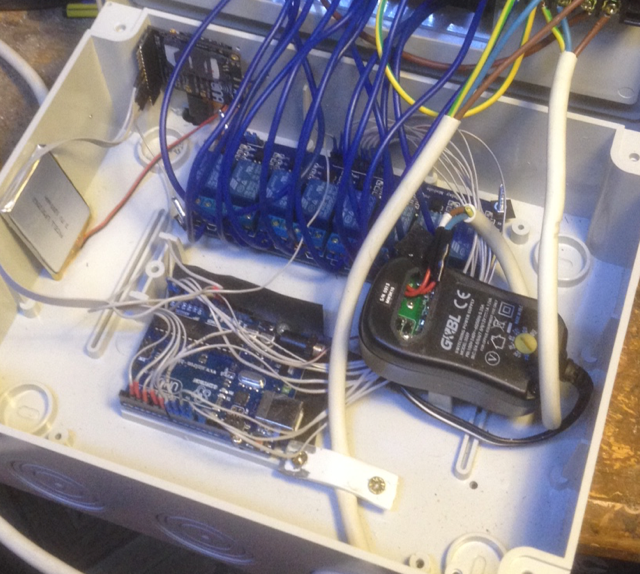
In order to control the PowerModule using a mobile phone remotely, the only way is to use internet and a GPRS connection. Also for this reason the Fona module is the perfect module for our project because the Adafruit library is perfectly done to manage SMS text message.
A good idea could be to control the Power Controller module sending text message with a predefined language in order to control everything installed on board: GPS and switches.
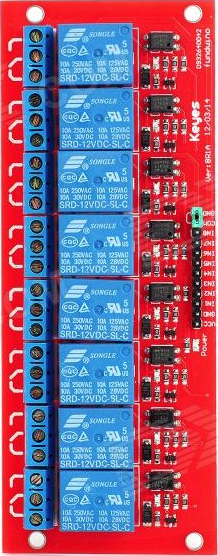
To drive a 220 switch there are different modules available on the market. Each one is very easy to use considering that you will simply need to put high or low a digital Arduino pin to activate or deactivate any relay so to let the 220V current to pass or not trough the plugs to any equipment you want to drive.
This is the one I bought
 Once all components have been decided we can just draw a quick schema to let you understand how it could work.
In the following schema you can see also some notes related to the Arduino source code I wrote in order to let it to work properly.
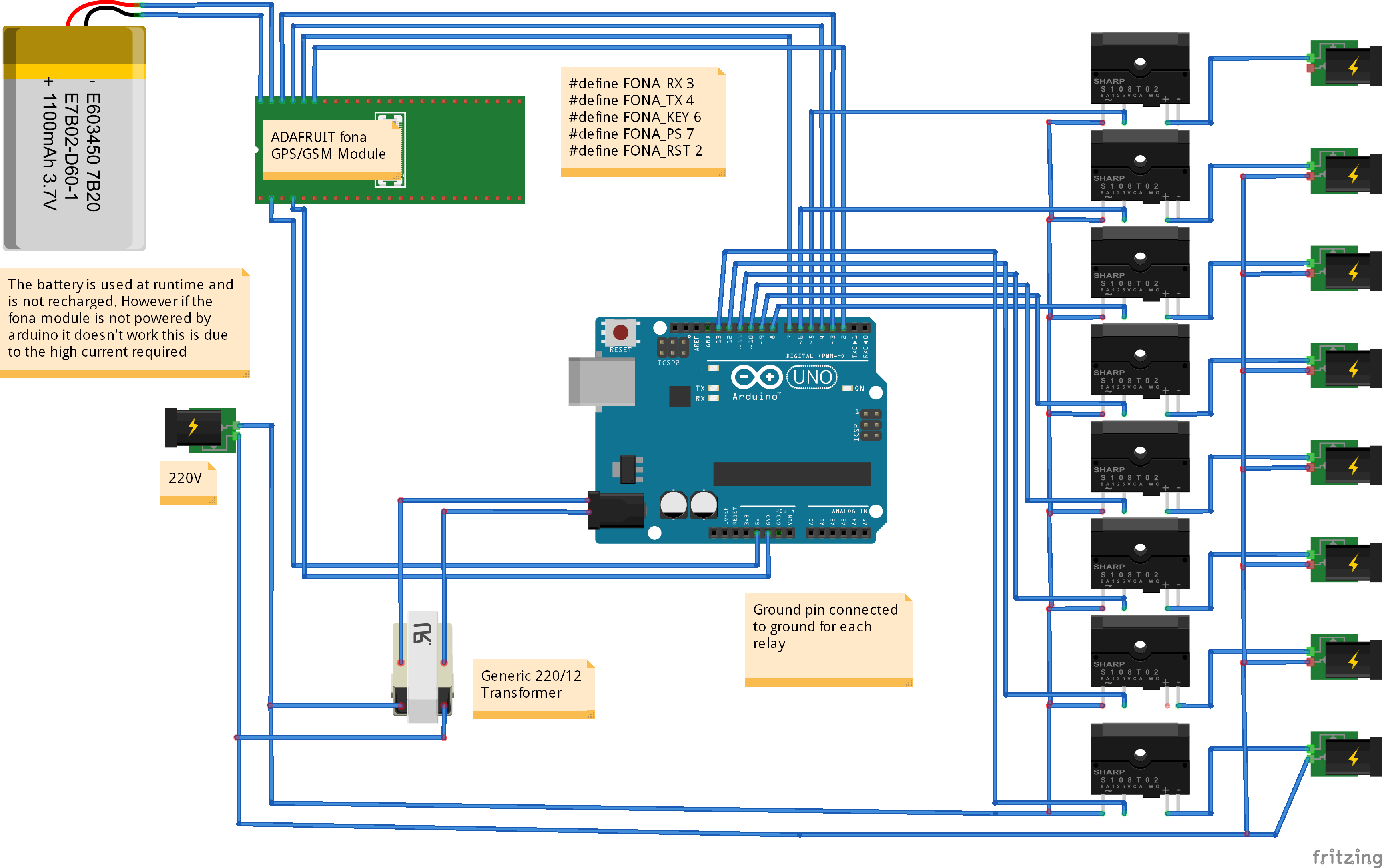 In few words, power IN is 220V and is a tension coming from an alternate power source (any domestic plug). The phase 1 is in common with all plugs. Each phase 2 pole is connected to each relays and from there to each phase 2 connectors of each output plug. The relays card is then connected to Arduino UNO together with the Adafruit Fona using all available digital PINs.
Note that the Adafruit Fona need to be always connected to a lipo (3.7V) battery. The power used by the Fona always come from the battery but the battery is charged normally from the external power source that you need to install and use to run Arduino.
In my schema there is a 12V transformer (I get the alternate current from the same source used for the relays) used for this purpose. One of the issues for this configuration is that the Power Activator stops working properly if 220V is not available and this means that it must be always connected to run in the right way. You will say that it has no sense to run it if you do not have any power switch to activate but assuming you want to run just the GPS module you could also run it just with an external backup battery.
In the near future, I will design another version of the power controller using some external battery too run Arduino and the Adafruit module.
The commands I decided to implement are 3 simple ones:
1) Give me your position
2) Activate switch number X
3) Deactivate switch number X
In addition to this I found very interesting to build a routine to send every X (it can be configured) second the position to a DB in order to store the path followed by the camper (or any other mobile 'subject') containing the Power Controller module.
For this purpose I built a REST function on an external website. This REST function simply get the http string parameters and store those parameters in a DB table. Parameters are latitude and longitude and once stored on the database the “sequence” of information (There is also a timestamp) could be used to draw a path on google map simply using google libraries or Google Map as it is in the desktop version.
In this case, you need to put in your Arduino code (using adafruit libraries) the code to activate GPRS communication and to send an HTTP get to the site where you implemented the REST feature.
Now, lets go to see how the code work:
Fiirst of all download the adafruit Fona library from our Download Area. If you need tome help to install the library into the arduino framework, don't forget that we wrote an interesting Tutorial to explain you how to do to setup libraries properly.
This is the piece of code needed to Activate the GPS and the GPRS module of the Adafruit Fona.
First of all declare connections, the fona object and the two softwareSerial lines:
            #define FONA_RX 3 //connect to FONA RX
            #define FONA_TX 4 //connect to FONA TX
            #define FONA_KEY 6 //connection to FONA KEY
            #define FONA_PS 7 //connect to FONA PS
            #define FONA_RST 2 //Connect to the FONA RST field

            SoftwareSerial fonaSS = SoftwareSerial(FONA_TX, FONA_RX);
            SoftwareSerial *fonaSerial = &fonaSS;

            Adafruit_FONA fona = Adafruit_FONA(FONA_RST);
            fonaSerial->begin(4800);
            if (!fona.begin(*fonaSerial)) {
              Serial.println(F("Couldn't find FONA"));
              while (1);
            }

            fona.setGPRSNetworkSettings(F("wap.omnitel.it"), F(""), F(""));

            //Init GPRS
            if (!fona.enableGPRS(true)) {
              Serial.println(F("ERROR:Failed to turn on GPRS 1st Attempt"));
              delay(1000);
              fona.enableGPRS(false);
              delay(1000);
              if (!fona.enableGPRS(true)) {
                Serial.println(F("ERROR:Failed to turn on GPRS 2nd Attempt"));
                return;
              }
              //continue
            }
            if (!fona.readSMS(1, replybuffer, 250, &smslen)) { // pass in buffer and max len!
              Serial.println("Failed!");
              break;
            }
            else
            {
              //Verify if the SMS received is a command SMS and is a Relay Control Command
              if (strncmp(replybuffer, "relay", 5) == 0)
                RelayNumber = atoi((const char*)replybuffer[5]);

              if (replybuffer[7] == '1')
                digitalWrite(RelayPin[RelayNumber], LOW);
              else
                digitalWrite(RelayPin[RelayNumber], HIGH);

            }
            digitalWrite(RelayPin[RelayNumber], LOW);
            else
            digitalWrite(RelayPin[RelayNumber], HIGH);
To read GPS values I wrote the following GetLocation() function
            boolean getLocation() {

                float latitude, longitude, speed_kph, heading, speed_mph, altitude;
                uint8_t GPSReturn;
                uint16_t GSMReturn;
                char gpsdata[80],tmpGpsdata[80];
                int commaCounter, commaLoc[10], commaFound;
                char tmpDate[23];
                int stat;	//GPS fix status
                int retry = 0;
                float GSMlat, GSMlon;

                //get the fix status of the GPS (otherwise has no sense to query
                stat = fona.GPSstatus();
                if (stat <= 0)  {
                  Serial.println(F("GPS is off exiting"));
                  return 0;
                }

                //Get date and Time
                fona.getTime(tmpDate, 23);
                strncpy(Time, strchr(tmpDate, ',') + 1, 8);
                strncpy(Date, tmpDate + 1, 8);

                //waiting for the GPS to became available
                while ((stat == 1) && (retry=GPSFIXRETRY-1)) {
                  delay(2000);
                  stat = fona.GPSstatus();
                  Serial.println(F("No Fix GPS. Waiting for coordinates"));
                  retry++;
                }


                if (retry == GPSFIXRETRY)	{	//maximum number of retry without signal. Try GSM network


                  if (!fona.getGSMLoc(&GSMReturn, tmpGpsdata, 80)) {
                    Serial.println(F("Failed!"));
                    return 0;
                  }
                  //add the 0, at the beginning
                  sprintf(gpsdata, "0,%s", tmpGpsdata);


                }
                else
                {
                  //this happens only if GPS signal is ok. Get GPS info
                  GPSReturn = fona.getGPS(0, gpsdata, 80);
                }
                //Reply in format: mode,longitude,latitude,altitude,utctime(yyyymmddHHMMSS),ttff,satellites,speed,course


                Serial.print("gpsdata: ");
                Serial.println(gpsdata);

                //if one of the methos is ok
                if ((GPSReturn>0) || (GSMReturn>0)) {

                  //Serach for all the commas into the string received from GPS
                  commaFound = 0;
                  for (commaCounter = 0; commaCounter < strlen(gpsdata); commaCounter++)  {
                    if (gpsdata[commaCounter] == ',')	{
                      commaLoc[commaFound] = commaCounter;
                      commaFound++;
                    }
                  }

                  //strncat the longitude
                  strncpy(Lon, gpsdata + (commaLoc[GPS_STR_MODE] + 1), commaLoc[GPS_STR_LONGITUDE] - commaLoc[GPS_STR_MODE] - 1);
                  strncpy(Lat, gpsdata + (commaLoc[GPS_STR_LONGITUDE] + 1), commaLoc[GPS_STR_LATITUDE] - commaLoc[GPS_STR_LONGITUDE] - 1);

                  Serial.println(F("Reading GPS DATA."));
                  Serial.print("Values:");
                  Serial.print(Lon);
                  Serial.print("-");
                  Serial.print(Lat);
                  Serial.print("-");
                  Serial.print(Date);
                  Serial.print("-");
                  Serial.println(Time);

                }

                else {
                  Serial.print("ERROR Retrieving GPS info ");
                  return 0;
                }


                return 1;
              }
            void makeRequest() { //Make HTTP GET request and then close out GPRS connection
              // read website URL
              uint16_t statuscode;
              int16_t length;
              char url[150];

              //Flush the serial
              flushSerial();

              sprintf(url, "Insert your REST url here with your %s", urlParameter);


              //Send the GET request and store the data on the external database
               if (!fona.HTTP_GET_start(url, &statuscode, (uint16_t *)&length)) {
                Serial.println("Failed!");
                return;
              }
              while (length > 0) {
                while (fona.available()) {
                  char c = fona.read();

                  // Serial.write is too slow, we'll write directly to Serial register!
            #if defined(__AVR_ATmega328P__) || defined(__AVR_ATmega168__)
                  loop_until_bit_is_set(UCSR0A, UDRE0); /* Wait until data register empty. */
                  UDR0 = c;
            #else
                  Serial.write(c);
            #endif
                  length--;
                  if (!length) break;
                }
              }
              Serial.println(F("\n****"));
              fona.HTTP_GET_end();

              //CLose the GPRS
              Serial.print("Disengage GPRS: ");
              if (!fona.enableGPRS(false))
                Serial.println(F("Failed to turn off"));

            }